[ 살펴보기 ] Swagger - OpenAPI Data Types
![[ 살펴보기 ] Swagger - OpenAPI Data Types](https://cdn.hashnode.com/res/hashnode/image/upload/v1732027480068/47f4b2a7-a436-4962-84d8-0242cddfba18.jpeg)
OpenAPI specification에서 사용할 수 있는 basic types은 다음과 같다 : string, number, ingeter, boolean, array, object.
schema의 data type은 type keywowrd를 통해 설정한다.
paths:
  /users:
    post:
      summary: Add a new user
      requestBody:
        description: a new user request body
        required: true
        content:
          application/json:
            schema:
              type: object # object type
              properties:
                username:
                  type: string # string type
type keyword를 통해선 하나의 type을 설정할 수 있으며 만약 특정 property가 string 또는 number type을 모두 허용하는 경우는 다음과 같이 type keyword 대신 oneOf keyword를 사용해 type을 정의할 수 있다.
paths:
  /users:
    post:
      summary: Add a new user
      requestBody:
        description: a new user request body
        required: true
        content:
          application/json:
            schema:
              type: object
              properties:
                age:
                  oneOf: # string 또는 integer
                    - type: string
                    - type: integer
                username:
                  type: string
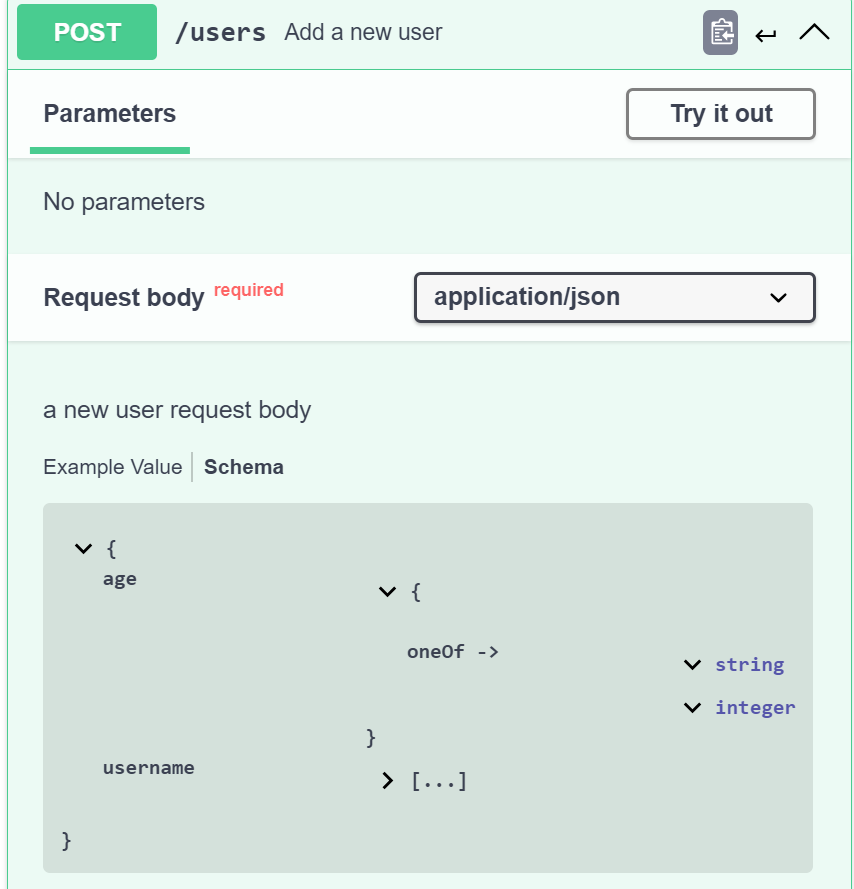
null type은 별개로 없으며 nullable attribute를 통해 basic types의 nullable 여부를 설정할 수 있다.
  /users:
    get:
      summary: Get user list
      parameters:
        - in: query
          name: limit
          schema:
            type: integer
            nullable: true # nullable
          description: The numbers of items to return
Objects
OpenAPI specification에서 object data type은 object keyword를 통해 표현한다. 예를 들어 아래는 name과 address property로 구성된 object를 정의하는 예제다.
paths:
  /users:
    post:
      summary: Add a new user
      requestBody:
        description: a new user request body
        required: true
        content:
          application/json:
            schema:
              type: object
              properties:
                 name:
                   type: string
                 address:
                   type: string
만약 object property 중 required property를 정의하고 싶다면 아래와 같이 required keyword에 object property key를 추가해준다.
paths:
  /users:
    post:
      summary: Add a new user
      requestBody:
        description: a new user request body
        required: true
        content:
          application/json:
            schema:
              type: object
              properties:
                 name:
                   type: string
                 address:
                   type: string
              required:
                - name
nested object는 다음과 같이 property type을 다시 object로 선언하여 새로운 object를 추가한다.
paths:
  /users:
    post:
      summary: Add a new user
      requestBody:
        description: a new user request body
        required: true
        content:
          application/json:
            schema:
              type: object
              properties:
                 name:
                   type: string
                 address:
                   type: string
                 info:
                   type: object
                   properties:
                     email:
                       type: string
Number
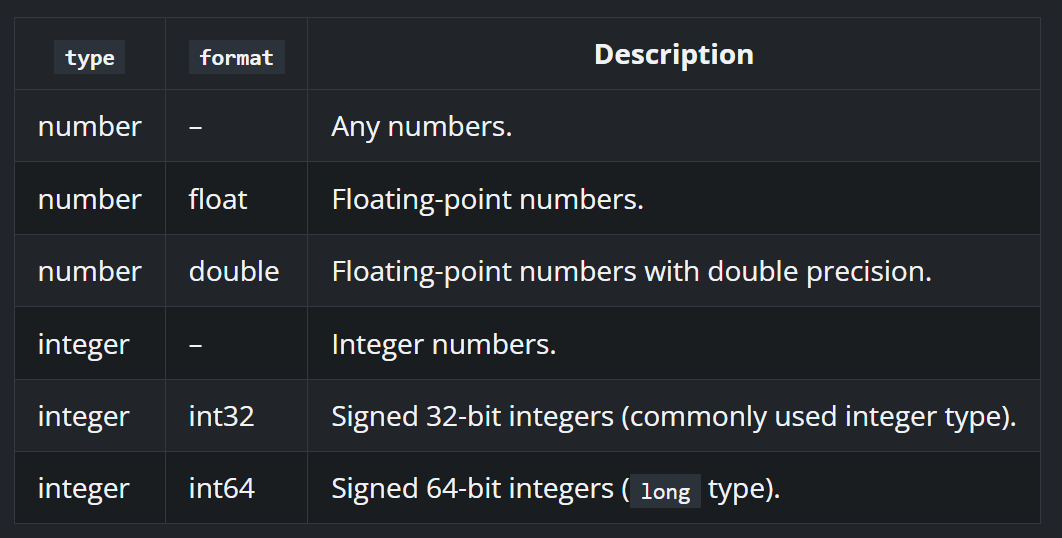
OpenAPI specification에서 사용할 수 있는 number type은 number와 integer 두 가지가 있다. number type은 integer와 floating-point numbers를 모두 포함한다. 추가로 format keyword를 통해 number 혹은 integer type에 대한 보다 상세한 정보를 설정할 수 있다. 다음은 OpenAPI documentation에서 소개하고 있는 format 종류와 format에 대한 설명이다.
paths:
  /users:
    post:
      summary: Add a new user
      requestBody:
        description: a new user request body
        required: true
        content:
          application/json:
            schema:
              type: object
              properties:
                age:
                  type: integer # integer type
number type을 설정할 때 minimum과 maximum keyword를 통해 설정할 수 있는 범위에 대한 정의를 추가할 수 있다.
paths:
  /users:
    post:
      summary: Add a new user
      requestBody:
        description: a new user request body
        required: true
        content:
          application/json:
            schema:
              type: object
              properties:
                age:
                  type: integer # integer type
                  minimum: 20
                  maximum: 40
Default로 minimum에 선언한 value와 maxium에 선언한 value는 허용 범위에 포함된다. 만약 minimum, maxium에 선언한 value를 허용범위에서 제외하고 싶다면, exclusiveMinimum 혹은 exclusiveMaximum을 true로 설정해준다. 예를 들어 다음 예제에선 exclusiveMinimum를 true로 설정하였기에 20은 허용 범위에 포함되지 않는다.
paths:
  /users:
    post:
      summary: Add a new user
      requestBody:
        description: a new user request body
        required: true
        content:
          application/json:
            schema:
              type: object
              properties:
                age:
                  type: integer # integer type
                  minimum: 20
                  maximum: 40
                  exclusiveMinimum: true
String
OpenAPI specification에서 string type data는 string keyword를 통해 정의한다.
paths:
  /users:
    post:
      summary: Add a new user
      requestBody:
        description: a new user request body
        required: true
        content:
          application/json:
            schema:
              type: object
              properties:
                age:
                  type: string # string type
String type의 length에 대한 정의는 minLength keyword와 maxLength keyword를 통해 추가할 수 있다.
paths:
  /users:
    post:
      summary: Add a new user
      requestBody:
        description: a new user request body
        required: true
        content:
          application/json:
            schema:
              type: object
              properties:
                age:
                  type: string # string type
                  minLength: 3
                  maxLength: 20
string value가 어떤 format의 data인지 추가 정보를 정의하고자 한다면 format keyword를 통해 설정할 수 있다.
paths:
  /users:
    post:
      summary: Add a new user
      requestBody:
        description: a new user request body
        required: true
        content:
          application/json:
            schema:
              type: object
              properties:
                birthday:
                  type: string # string type
                  format: date
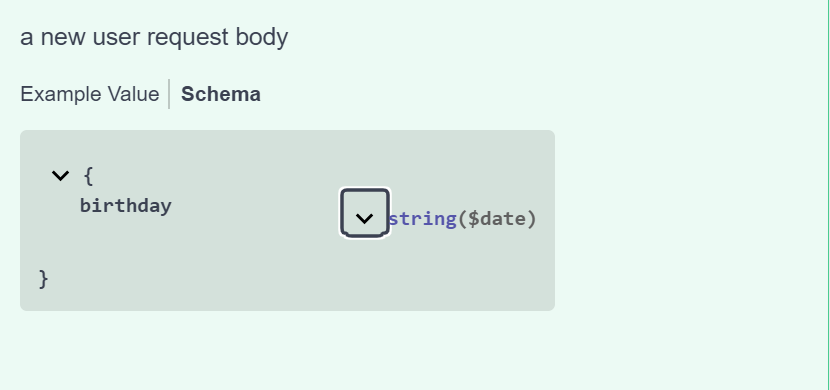
string format에는date, date-time, password등과 같은 OpenAPI built-in string format을 사용할 수도 있고 email, uuid와 같은 형식의 format을 사용할 수도 있다. ( Reference - String Formats )
Arrays
OpenAPI specification에서 array type은 다음과 같이 정의할 수 있다.
paths:
  /users:
    post:
      summary: Add a new user
      requestBody:
        description: a new user request body
        required: true
        content:
          application/json:
            schema:
              type: object
              properties:
                hobbies:
                  type: array # array type
                  items:
                    type: string
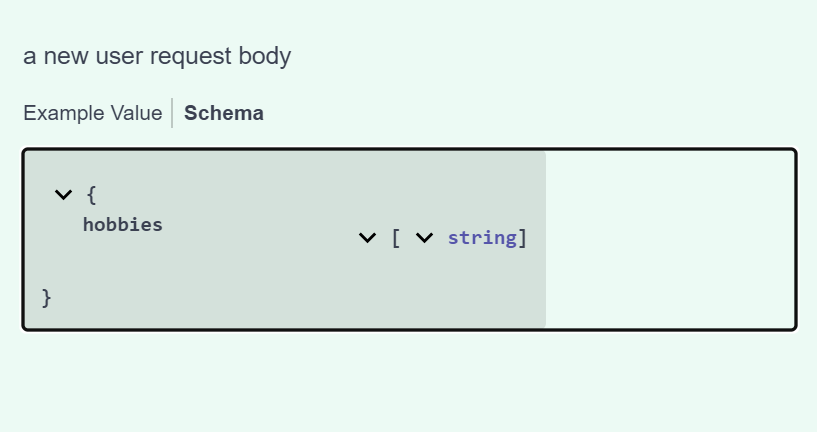
만약 object array를 정의하고 싶으면 다음과 같이 array item의 type을 object로 정의하고 각 object의 properties를 정의한다.
paths:
  /users:
    post:
      summary: Add a new user
      requestBody:
        description: a new user request body
        required: true
        content:
          application/json:
            schema:
              type: object
              properties:
                hobbies:
                  type: array # array type
                  items:
                    type: object
                    properties:
                      category:
                        type: string
                      name:
                        type: string
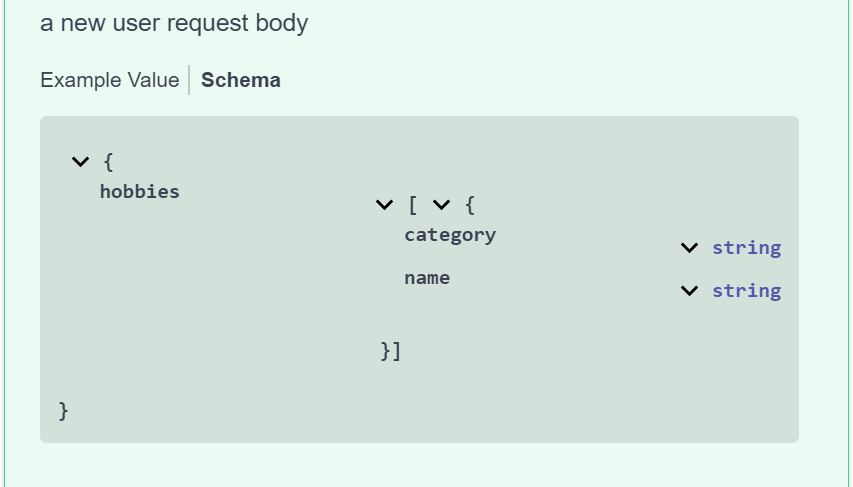
[‘test’, 10, ‘test2’]와 같이 string, integer type의 value가 함께 포함되는 array type에 대한 정의는 다음과 같이 할 수 있다.
paths:
  /users:
    post:
      summary: Add a new user
      requestBody:
        description: a new user request body
        required: true
        content:
          application/json:
            schema:
              type: object
              properties:
                hobbies:
                  type: array
                  items:
                    oneOf:
                      - type: string
                      - type: integer
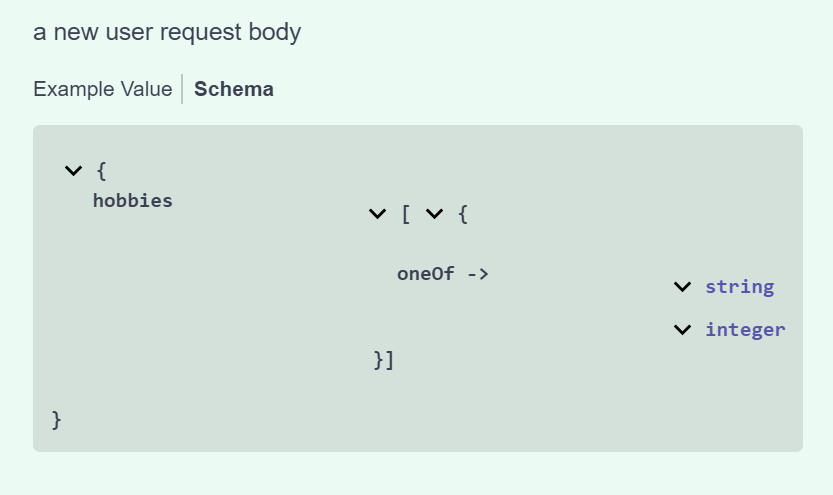
array length에 대한 정의는 minItems keyword와 maxItems keyword를 통해 정의할 수 있다.
type: array
items:
  type: integer
minItems: 1
maxItems: 10
File
OpenAPI 3.0 specification에선 별도의 file type이 존재하지 않는다. File type을 표현하고자 한다면 다음과 같이 string type과 format keyword를 통해 표현한다.
type: string
format: binary # binary file contents

type: string
format: byte # base64-encoded file contents
다음은 file을 request body로 전달 받는 endpoint에 대한 예제다.
paths:
  /users:
    post:
      summary: Add a new user
      requestBody:
        description: a new user request body
        required: true
        content:
            multipart/form-data:
              schema:
                type: object
                properties:
                  userId:
                    type: string
                  fileName:
                    type: string
                    format: binary
Any
data property에 별도의 type없이 {}만 선언해 주면 number, string, object 등 모든 type의 value를 허용하는 any type이 된다.
paths:
  /users:
    post:
      summary: Add a new user
      requestBody:
        description: a new user request body
        required: true
        content:
          application/json:
            schema:
              type: object
              properties:
                name:
                  {}
위의 예제는 아래의 예제와 동일하다.
paths:
  /users:
    post:
      summary: Add a new user
      requestBody:
        description: a new user request body
        required: true
        content:
          application/json:
            schema:
              type: object
              properties:
                name:
                  anyOf:
                    - type: string
                    - type: number
                    - type: integer
                    - type: boolean
                    - type: array
                      items: {}
                    - type: object
Enums
OpenAPI specification에서 사용 가능한 특정 값으로 구성된 enum type은 enum keyword를 통해 표현할 수 있다. 아래의 예제에서 name property는 jake 또는 jane으로 구성된 enum type을 표현한다.
paths:
  /users:
    post:
      summary: Add a new user
      requestBody:
        description: a new user request body
        required: true
        content:
          application/json:
            schema:
              type: object
              properties:
                name:
                  type: string
                  enum: [jake, jane]
oneOf
사용할 수 있는 data type이 여러 개 중에 하나 일 때 oneOf keyword를 통해 표현할 수 있다. 만약 requestBody가 address와 city property를 가진 object일 수도 있고 name과 age property를 가진 object일 수도 있을 때 다음과 같이 정의해준다.
paths:
  /users:
    post:
      summary: Add a new user
      requestBody:
        description: a new user request body
        required: true
        content:
          application/json:
            schema:
              oneOf:
                - type: object
                  properties:
                    address:
                      type: string
                    city:
                      type: string
                - type: object
                  properties:
                    name:
                      type: string
                    age:
                      type: integer
oneOf keyword는 정의된 data type중 하나에 해당하는 값이 전달되어야 정상으로 취급한다. 예를 들어 위의 specification 기준으로 다음 두 json request body는 모두 정상으로 취급된다.
{
  "address": "test address",
  "city": "test city"
}

{
  "name": "test name",
  "age": 20
}
하지만 아래 request body는 oneOf에 정의된 daya type 둘 다 포함하고 있는 request이므로 정상으로 취급되지 않는다.
{
  "address": "test address",
  "city": "test city",
  "name": "test name",
  "age": 20
}
anyOf
oneOf keywrod는 정의된 daya type 중 단 하나와 일치해야 정상취급되는 반면 anyOf을 통해 정의된 data type중 어느 data라도 포함하고 있으면 정상 취급된다.
paths:
  /users:
    post:
      summary: Add a new user
      requestBody:
        description: a new user request body
        required: true
        content:
          application/json:
            schema:
              anyOf:
                - type: object
                  properties:
                    address:
                      type: string
                    city:
                      type: string
                  required:
                   - address  # address required
                - type: object
                  properties:
                    name:
                      type: string
                    age:
                      type: integer
                  required:
                    - name # name required
위의 예제와 같이 request body가 anyOf으로 정의되어 있다면 아래의 request body는 모두 정상 취급된다.
{
  "address": "test address"
}

{
  "address": "test address",
  "city": "test city"
}

{
  "address": "test address",
  "city": "test city",
  "name": "test name",
  "age": 20
}
주의할 점은 anyOf keyword으로 data type을 지정했을지라도 전달 되는 property가 포함된 object중 required property가 포함되어 있지 않으면 정상으로 취급되지 않는다. 즉, 아래 request body에서 city property가 포함된 object에서 정의하는 required field인 address가 없고 age가 소속된 object의 required field인 name이 없으므로 정상으로 취급되지 않는다.
{
  "city": "test city",
  "age": 20
}
Not
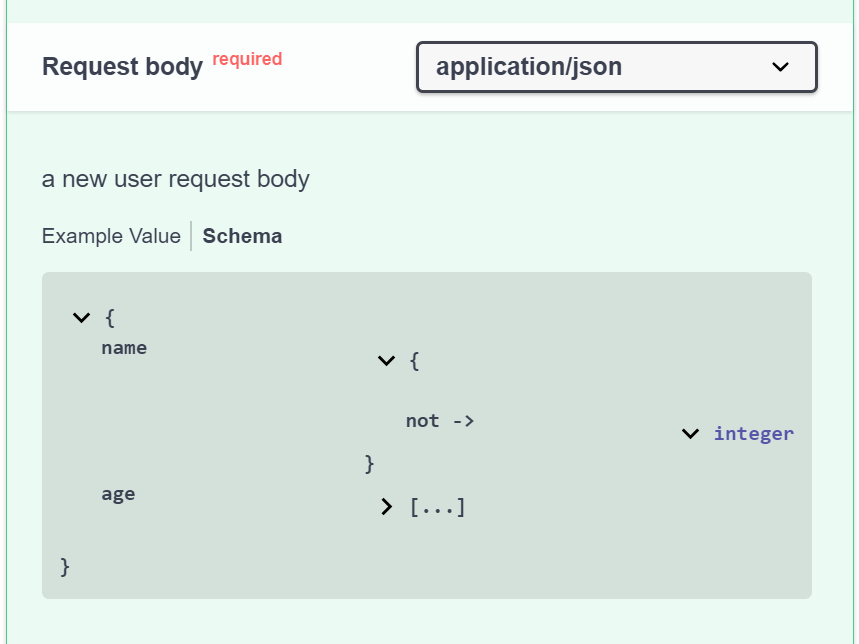
만약 특정 data type이 string을 제외한 모든 type, integer를 제외한 모든 type과 같이 특정 type을 제외하고 모든 type을 허용한다는 것을 정의하고 싶다면 다음과 같이 not keyword를 사용한다. 다음 예제에서 name field는 integer type을 제외한 모든 type을 허용한다.
paths:
  /users:
    post:
      summary: Add a new user
      requestBody:
        description: a new user request body
        required: true
        content:
          application/json:
            schema:
              type: object
              properties:
                name:
                  not:
                    type: integer
                age:
                  type: integer
![[ 살펴보기 ] RDB - Relationships](https://cdn.hashnode.com/res/hashnode/image/upload/v1739711556668/48dc9e84-a621-42aa-9c9f-5fc5c436f0ec.jpeg)
![[ 살펴보기 ] MySQL - Data types](https://cdn.hashnode.com/res/hashnode/image/upload/v1739593589113/530f8704-4d27-42c9-a451-bb5c63150b99.jpeg)
![[ 살펴보기 ] TypeORM - Transactions, Migration](https://cdn.hashnode.com/res/hashnode/image/upload/v1739106042581/980b8133-61d4-406a-a026-65be9c28eace.jpeg)
![[ 살펴보기 ] TypeORM - Relations](https://cdn.hashnode.com/res/hashnode/image/upload/v1738666874402/b688bd0b-b6bb-4f43-87d8-c1b46b59f1b7.jpeg)
![[ 살펴보기 ] TypeORM - Basics](https://cdn.hashnode.com/res/hashnode/image/upload/v1738666803591/bef5df17-7dc7-4123-ae55-004d5042df39.jpeg)