[ 살펴보기 ] TailwindCSS - Plugin
![[ 살펴보기 ] TailwindCSS - Plugin](https://cdn.hashnode.com/res/hashnode/image/upload/v1725949871504/c70ae56e-8c95-47ec-911e-3a34944e6ba9.jpeg)
Tailwind에선 plugin을 통해 특정 html element의 default style을 reset하거나 특정 element에 목적에 따른 style을 추가하는 등 다양한 작업을 할 수 있다. 본인만의 plugin을 만들어 적용할 수도 있지만 우선 Tailwind에서 제공하는 Official plugin을 살펴보자.
Typography plugin
Typography plugin는 prose라는 새로운 class utility를 제공하며 prose class utility가 적용된 element로 감싸진 다른 element들에 default typography style을 적용한다.
먼저 plugin인 설치한다.
npm install -D @tailwindcss/typography
그리고 tailwind.config.ts 파일에 해당 plugin을 추가한다.
import type { Config } from "tailwindcss";

const config: Config = {
  ...
  plugins: [require("@tailwindcss/typography")],
};
export default config;
Plugin의 설치와 configuration 설정을 마쳤다면 다음 예제와 같이 prose clsss utility를 사용할 수 있다.
<div className="flex space-x-5">
  <article className="prose">
    <h1>Garlic bread with cheese: What the science tells us</h1>
    <p>
      For years parents have espoused the health benefits of eating
      garlic bread with cheese to their children, with the food earning
      such an iconic status in our culture that kids will often dress up
      as warm, cheesy loaf for Halloween.
    </p>
    <p>
      But a recent study shows that the celebrated appetizer may be
      linked to a series of rabies cases springing up around the
      country.
    </p>
  </article>
  <article>
    <h1>Garlic bread with cheese: What the science tells us</h1>
    <p>
      For years parents have espoused the health benefits of eating
      garlic bread with cheese to their children, with the food earning
      such an iconic status in our culture that kids will often dress up
      as warm, cheesy loaf for Halloween.
    </p>
    <p>
      But a recent study shows that the celebrated appetizer may be
      linked to a series of rabies cases springing up around the
      country.
    </p>
  </article>
</div>

위의 이미지에서 prose class가 적용된 element가 왼쪽의 article block이고 그렇지 않는 element가 오른쪽의 article block이다.
Markdown을 render해서 display하는 경우와 같이 내부 element의 style을 직접 조작하지 못하는 상황에서 유용하게 사용할 수 있다.
prose style에 적용될 각 element의 color theme을 설정할 수 있다. 기본으로 설정되어 있는 color theme은 prose-gray이며 gray외에 설정할 수 있는 color theme은 prose-slate, prose-zinc, prose-neutral, prose-stone이 있다. 모두 gray 계열이라 차이점을 구분하기 힘들 수 있는데 원하는 color theme을 추가할 수도 있으며 추가 하는 법은 아래에서 살펴본다.
아래는 prose-slate theme color를 적용하는 예제이다.
<article className="prose prose-slate">
  <h1>
    Garlic bread with cheese: What the science tells us
  </h1>
  <p>
    For years parents have espoused the health benefits of eating garlic
    bread with cheese to their children, with the food earning such an
    iconic status in our culture that kids will often dress up as warm,
    cheesy loaf for Halloween.
  </p>
  <p>
    But a recent study shows that the celebrated appetizer may be linked
    to a series of rabies cases springing up around the country.
  </p>
</article>
prose style에 적용될 font-size을 결정하는 type scale 역시 변경할 수 있다. 적용된 type scale에 따라 각 html element에 적용되는 font-size가 달라진다. default 값으로는 prose-base가 적용되어 있으며 prose-sm, prose-lg, prose-xl, prose-2xl로 변경할 수 있다.
<div className="flex space-x-20">
  <article className="prose">
    <h1>Garlic bread with cheese: What the science tells us</h1>
    <p>
      For years parents have espoused the health benefits of eating
      garlic bread with cheese to their children, with the food earning
      such an iconic status in our culture that kids will often dress up
      as warm, cheesy loaf for Halloween.
    </p>
    <p>
      But a recent study shows that the celebrated appetizer may be
      linked to a series of rabies cases springing up around the
      country.
    </p>
  </article>
  <article className="prose prose-xl">
    <h1>Garlic bread with cheese: What the science tells us</h1>
    <p>
      For years parents have espoused the health benefits of eating
      garlic bread with cheese to their children, with the food earning
      such an iconic status in our culture that kids will often dress up
      as warm, cheesy loaf for Halloween.
    </p>
    <p>
      But a recent study shows that the celebrated appetizer may be
      linked to a series of rabies cases springing up around the
      country.
    </p>
  </article>
</div>
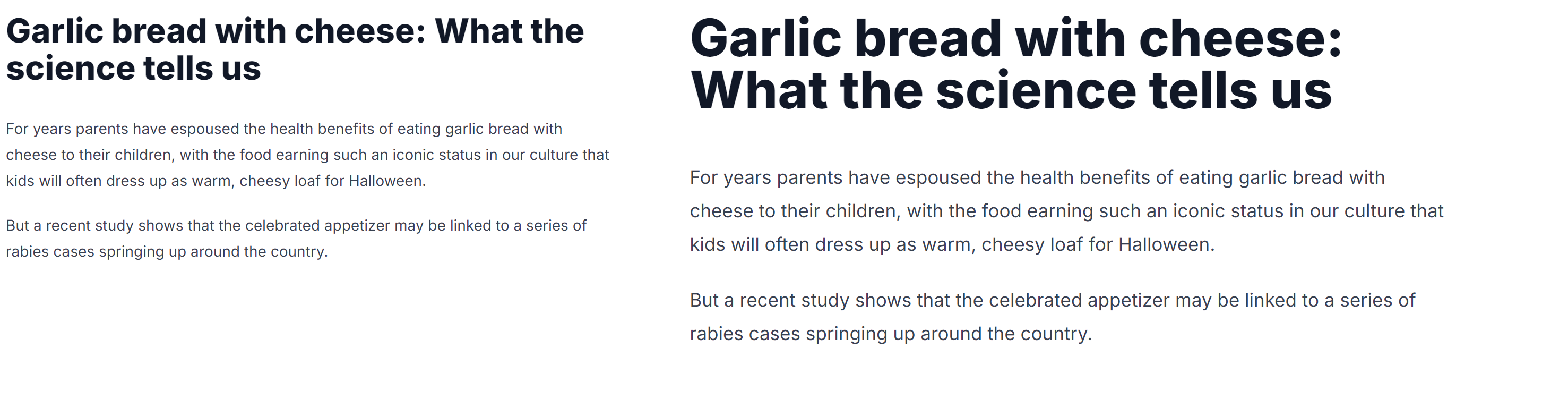
예제에서 왼쪽은 prose-base scale이 적용된 article block이고 오른쪽은 prose-xl scale이 적용된 article block이다.
만약 prose element의 chilren element 중 img, p element와 같이 특정 element에 대한 style을 적용하고 싶다면 아래와 같이 할 수 있다.
<article className="prose prose-img:rounded-lg prose-p:text-green-500">
  ...
</article>
위의 예제는 prose element의 children element 중 img의 border-radius를 추가하고 p element의 text color를 green-500으로 설정한다.
또한 hover와 같은 action mofidier와 연동하여 사용할 수 도 있다.
<article className="prose hover:prose-img:rounded-lg prose-p:text-green-500">
  ...
</article>
위의 예제는 img element에 hover가 발생할 때 img element에 border-radius를 적용한다.
만약에 prose element의 children element 중 plugin의 style을 적용하고 싶지 않은 element가 있다면 해당 element에 not-prose class를 추가해준다.
<article className="prose prose-slate">
  <h1 className="not-prose">
    Garlic bread with cheese: What the science tells us
  </h1>
  <p>
    For years parents have espoused the health benefits of eating garlic
    bread with cheese to their children, with the food earning such an
    iconic status in our culture that kids will often dress up as warm,
    cheesy loaf for Halloween.
  </p>
  <p>
    But a recent study shows that the celebrated appetizer may be linked
    to a series of rabies cases springing up around the country.
  </p>
</article>
위의 예제에서 h1 element에 plugin의 style을 적용하지 않도록 not-prose class를 추가하였다.
만약 plugin이 제공하는 default color theme외에 custom color theme을 추가하여 사용하고 싶다면 아래와 같이 tailwind.config.ts에서 extand property를 통해 추가해줄 수 있다.
import type { Config } from "tailwindcss";
import { PluginAPI } from "tailwindcss/types/config";

const config: Config = {
  ...
  theme: {
    extend: {
      typography: (theme: PluginAPI["theme"]) => ({
        blue: {
          css: {
            "--tw-prose-body": theme("colors.blue[800]"),
            "--tw-prose-headings": theme("colors.blue[900]"),
            "--tw-prose-lead": theme("colors.blue[700]"),
            "--tw-prose-links": theme("colors.blue[900]"),
            "--tw-prose-bold": theme("colors.blue[900]"),
            "--tw-prose-counters": theme("colors.blue[600]"),
            "--tw-prose-bullets": theme("colors.blue[400]"),
            "--tw-prose-hr": theme("colors.blue[300]"),
            "--tw-prose-quotes": theme("colors.blue[900]"),
            "--tw-prose-quote-borders": theme("colors.blue[300]"),
            "--tw-prose-captions": theme("colors.blue[700]"),
            "--tw-prose-code": theme("colors.blue[900]"),
            "--tw-prose-pre-code": theme("colors.blue[100]"),
            "--tw-prose-pre-bg": theme("colors.blue[900]"),
          },
        },
      }),
    },
  },
  plugins: [require("@tailwindcss/typography")],
};
export default config;
위의 예제에서 blue라는 이름의 새로운 color theme을 추가했다. 새로운 theme을 추가하면 다음과 같이 prose와 함께 사용할 수 있다.
<article className="prose prose-blue">
  ...
</article>
만약 plugin이 제공하는 특정 element의 default style을 변경하고 싶다면 tailwind.config.ts 파일에서 다음과 같이 수정해준다.
import type { Config } from "tailwindcss";
import { PluginAPI } from "tailwindcss/types/config";

const config: Config = {
  ...
  theme: {
    extend: {
      typography: (theme: PluginAPI["theme"]) => ({
        DEFAULT: {
          css: {
            p: {
              color: theme("colors.green.800"),
              "&:hover": {
                color: "#2c5282",
              },
            },
          },
        },
      }),
    },
  },
  plugins: [require("@tailwindcss/typography")],
};
export default config;
위의 예제에서 p element의 default color와 hover color를 override하고 있다. 이제 prose style을 적용한 element block을 보면 p element에는 위에서 설정한 색상이 적용되는 것을 볼 수 있다.
Forms plugin
forms plugin은 form 관련 element의 default style을 reset하고 기본적인 style을 제공하여 tailwind class utility를 통해 보다 쉽게 form element에 style을 적용할 수 있게 도와준다.
forms plugin 사용을 위해 해당 plugin을 설치하고 tailwind.config.ts 파일에 forms plugin을 추가해준다.
npm install -D @tailwindcss/forms
import type { Config } from "tailwindcss";

const config: Config = {
  ...
  plugins: [require("@tailwindcss/forms")],
};
export default config;
forms pluing은 typography plugin과는 달리 element에 필수로 추가해야 하는 class utiltiy는 없다. 위 처럼 plugin을 적용하면 input, select, checkbox와 같은 form elements에 기본 style이 적용되고 기본 tailwindcss class를 통해 보다 쉽게 style을 변경할 수 있다.
<select className="px-2 py-2 rounded-full">
  <option value="tea">Tea</option>
  <option value="coffee">Coffee</option>
  <option value="juice">Juice</option>
</select>

<input type="checkbox" className="rounded text-green-500" />
만약 form element가 아닌 일반 element에 특정 input style을 적용하고 싶다면 plugin에서는 form-* 형식의 class utility를 제공한다. 예를 들어 div element의 checkbox style을 적용하고 싶다면 아래와 같이 적용할 수 있다.
<div className="form-checkbox"></div>
지원하는 form-* class는 documentation에서 확인할 수 있다. ( Using classes to style )
forms plugins을 적용하면 form을 reset하고 적용되는 default style이 global level로 적용된다. 만약 이미 작업중인 project에 plugin을 적용하려고 한다면 기존 style을 override해서 문제가 발생할 수도 있다. 그렇기에 만약 plugin을 global level로 적용하지 않고 위의 예제처럼 form-* 형식으로 원하는 element에만 plugins default style을 적용하고 싶으면 tailwind.config.ts 파일을 다음과 같이 수정한다.
import type { Config } from "tailwindcss";

const config: Config = {
  ...
  plugins: [
    require("@tailwindcss/forms")({
      strategy: "class",
    }),
  ],
};
export default config;
위와 같이 plugin을 추가할 때 strategy를 class로 설정하면 plugins default style이 global로 적용되지 않는다.
Aspect ratio plugin
aspect-w-*, aspect-h-* class utility를 통해 특정 element의 aspect ratio를 보다 쉽게 설정할 수 있게 해준다. plugin을 설치하고 configuration에 추가해주자.
npm install -D @tailwindcss/aspect-ratio
import type { Config } from "tailwindcss";

const config: Config = {
  ...
  corePlugins: {
    aspectRatio: false,
  },
  plugins: [require("@tailwindcss/aspect-ratio")],
};
export default config;
aspect ratio plugin을 사용할 때는 위와 같이 tailwind core plugin과 충돌을 방지하지 위해 core plugin의 aspectRatio는 dsiable 시켜준다. Tailwind v3부터 native aspect ratio clss utility를 지원하지만 Browser version에 따라 지원이 안될 수 있으므로 보다 안전한 Browser 지원을 위해 해당 plugin을 사용할 수 있다.
Aspect ratio plugin은 element의 aspect ratio를 설정할 때 padding-bottom trick을 사용하고 있으므로 aspect ratio를 설정하고 싶은 element의 parent element에 실제 aspect ratio 값을 설정해야한다.
<div className="aspect-w-4 aspect-h-3 w-full h-[500px]">
  <iframe
    ...
  />
</div>
위의 예제는 iframe의 aspect ratio를 4:3으로 지정하는 예제이다. 위의 예제와 같이 iframe의 aspect ratio를 지정하기 위해 parent element에 aspect ratio를 설정하는 class utility를 추가해주고 있다.
![[ 살펴보기 ] RDB - Relationships](https://cdn.hashnode.com/res/hashnode/image/upload/v1739711556668/48dc9e84-a621-42aa-9c9f-5fc5c436f0ec.jpeg)
![[ 살펴보기 ] MySQL - Data types](https://cdn.hashnode.com/res/hashnode/image/upload/v1739593589113/530f8704-4d27-42c9-a451-bb5c63150b99.jpeg)
![[ 살펴보기 ] TypeORM - Transactions, Migration](https://cdn.hashnode.com/res/hashnode/image/upload/v1739106042581/980b8133-61d4-406a-a026-65be9c28eace.jpeg)
![[ 살펴보기 ] TypeORM - Relations](https://cdn.hashnode.com/res/hashnode/image/upload/v1738666874402/b688bd0b-b6bb-4f43-87d8-c1b46b59f1b7.jpeg)
![[ 살펴보기 ] TypeORM - Basics](https://cdn.hashnode.com/res/hashnode/image/upload/v1738666803591/bef5df17-7dc7-4123-ae55-004d5042df39.jpeg)